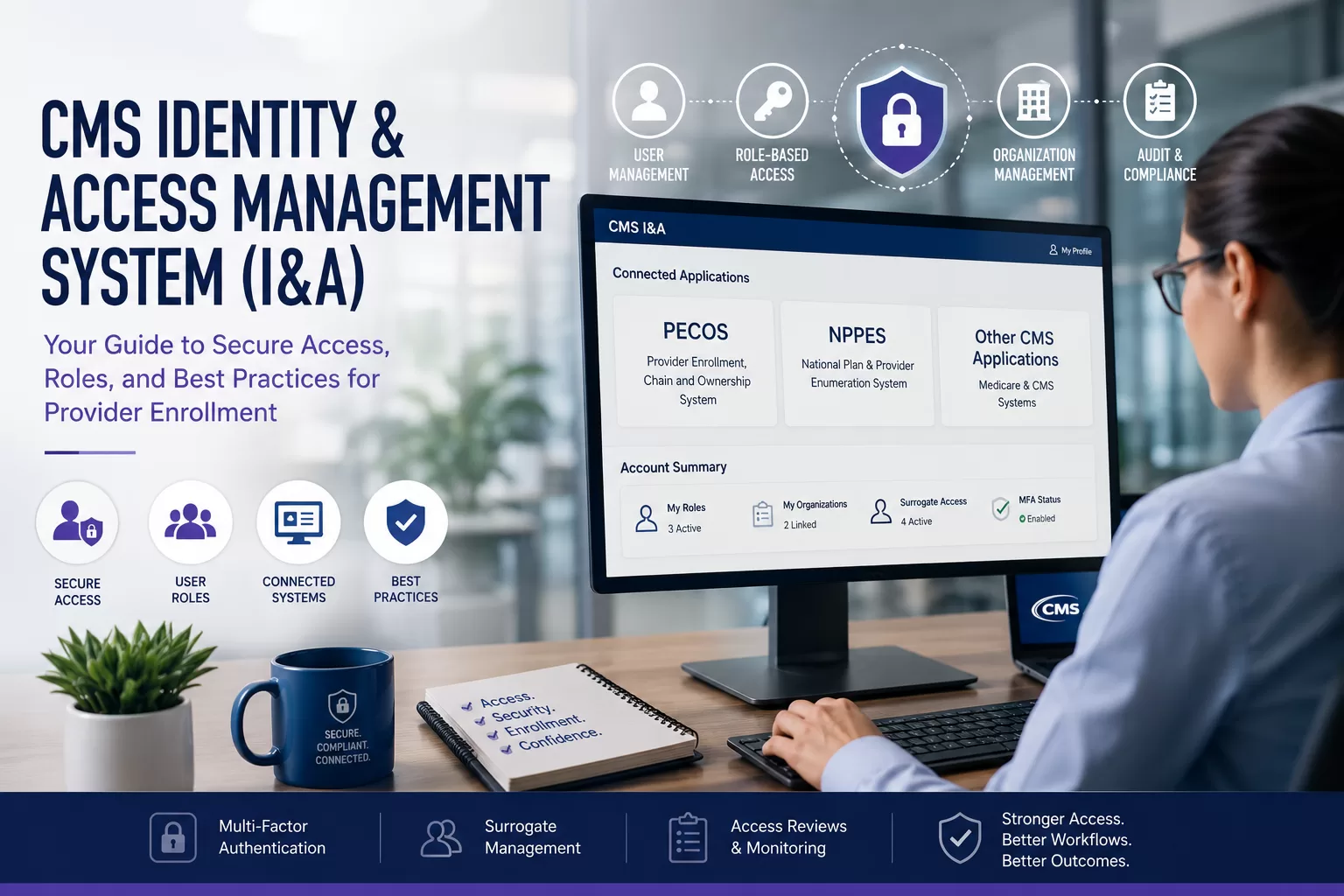
Critical CMS Identity and Access Management System Workflows for Provider Enrollment
The CMS Identity and Access Management System (I&A) is one of the most important access points in the Medicare provider enrollment and credentialing process. Providers, medical practices, billing companies, and credentialing teams use the CMS I&A system to securely access major CMS platforms, including PECOS, NPPES, and other Medicare-related systems. These platforms support provider enrollment, NPI management, reassignment, and compliance workflows.
For many healthcare organizations, the CMS I&A system serves as the operational foundation for Medicare enrollment and provider access management. Whether you’re enrolling a new provider in Medicare, updating NPI information, managing user permissions for office staff, or granting access to a credentialing company or billing service, the process typically starts here. Many enrollment and access workflows depend on this system functioning properly.
Operational Snapshot
CMS I&A is more than a login portal. It functions as the access-control foundation for Medicare enrollment, NPI management, reassignment workflows, and organizational permissions across multiple CMS systems.
The system is designed to centralize access while maintaining strict security standards around sensitive provider and organizational data. That includes multi-factor authentication (MFA), role-based permissions, user access controls, and verification processes. These safeguards help protect Medicare enrollment records and connected CMS systems.
In this guide, we’ll walk through how the CMS Identity and Access Management System works and how it connects to platforms like PECOS and NPPES. We’ll also cover how user roles and permissions work, common troubleshooting issues, and operational best practices to keep your provider enrollment workflows secure and organized.
Key Takeaways:
- CMS I&A serves as the centralized authentication system for PECOS, NPPES, and connected CMS platforms.
- Role-based access controls directly affect provider enrollment and credentialing workflows.
- Staffing transitions commonly create access management problems when permissions are not updated.
- Surrogate relationships should be reviewed regularly to reduce outdated third-party access.
- MFA management and current recovery information help reduce enrollment interruptions.
Table of Contents
What the CMS I&A System Actually Does
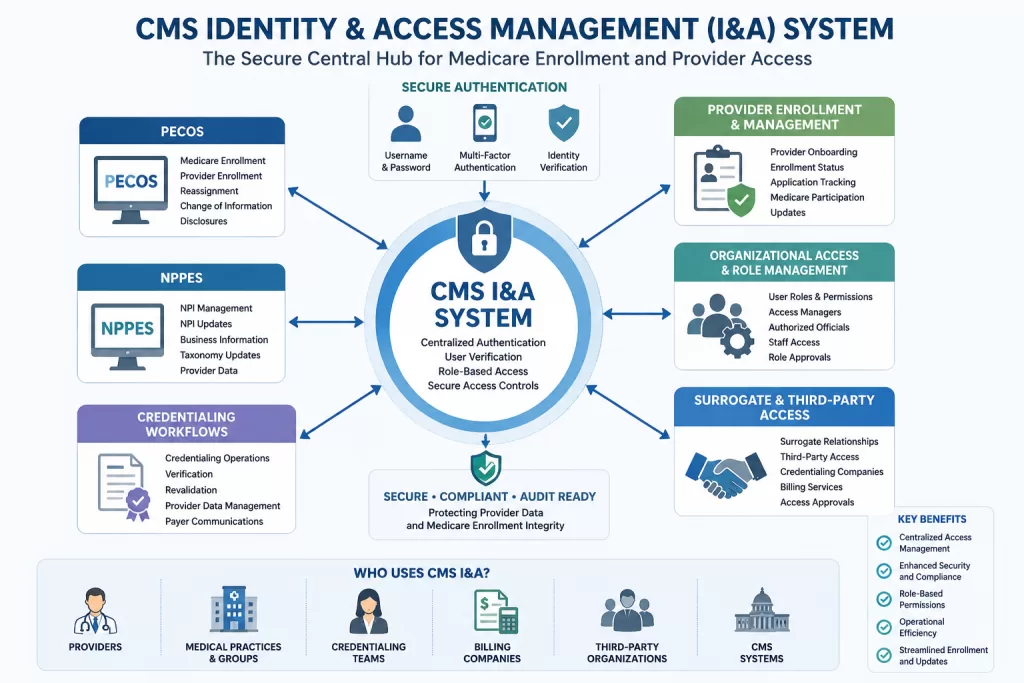
The CMS Identity and Access Management (I&A) System serves as the centralized access management platform for multiple CMS applications tied to provider enrollment, Medicare administration, and credentialing workflows. Once an account is created and verified, users can securely access connected systems such as PECOS for Medicare enrollment and reassignment activities.
They can also access NPPES for NPI management and updates. Because alignment errors here can trigger downstream front-end adjudication rejections, maintaining accurate baseline numbers is a vital component of a practice’s broader NPI data management strategy.
Rather than maintaining separate credentials across multiple CMS platforms, the CMS I&A system centralizes authentication, user verification, and role-based access management in a single secure system.
This structure helps CMS maintain tighter security controls while allowing providers, medical practices, credentialing teams, billing companies, and third-party organizations to manage enrollment-related processes more efficiently.
Because the CMS I&A system controls authentication and role-based access across multiple Medicare-related platforms, it often serves as the operational link among provider enrollment, organizational access management, and credentialing workflows.
The system determines who can access enrollment records, approve organizational relationships, manage surrogate connections, and update provider information across connected CMS systems like PECOS and NPPES.
CMS Systems Commonly Managed Through CMS I&A
| CMS System | Primary Purpose | Common Administrative Use |
|---|---|---|
| PECOS | Medicare enrollment and reassignment | Provider enrollment and enrollment updates |
| NPPES | NPI management | NPI creation and maintenance |
| EHR Incentive Program | CMS incentive participation | Program registration and reporting |
| CMS I&A | Access and identity management | User permissions and organizational access |
CMS I&A Account Setup and Access Best Practices
When setting up a CMS I&A account, it’s important to set it up correctly from the beginning. Because the account connects directly to Medicare enrollment systems and organizational access management systems, setup errors can create long-term operational problems. Those problems are often difficult to untangle later.
Compliance Alert
Many Medicare enrollment delays originate from access-management failures rather than enrollment errors. Incorrect permissions, inactive accounts, or unresolved approvals can halt critical workflows unexpectedly.
For example, practices sometimes discover that MFA was tied to a former employee’s phone number. In other situations, critical PECOS access may still be connected to an outdated organizational email address during an active enrollment update.
When you first reach the CMS I&A homepage, you’ll either sign in using existing credentials or create a new account through the registration process. During setup, several important best practices help prevent long-term access and security problems.
- Use a personal email address and phone number instead of employer-owned contact information whenever possible. CMS I&A accounts often remain active across employer changes, organizational transitions, and provider relocations.
- Enable multi-factor authentication (MFA) immediately and maintain access to the authentication devices and recovery methods associated with the account.
- Avoid shared credentials and maintain individual staff logins to preserve accountability and CMS access compliance.
- Keep account information current, including recovery email addresses, phone numbers, and mailing information, to reduce login recovery and verification issues tied to PECOS or NPPES access.
Why the CMS I&A System Matters for Provider Enrollment
The CMS Identity and Access Management System plays a direct operational role in Medicare enrollment, provider credentialing, organizational access management, and healthcare administrative coordination. Because systems like PECOS and NPPES rely on CMS I&A authentication and role-based permissions, account access issues can quickly disrupt provider enrollment activities and reassignment processing. They can also interrupt credentialing operations and organizational onboarding workflows.
Healthcare organizations often rely on the CMS I&A system to manage access for providers, credentialing specialists, billing teams, operational leadership staff, and third-party enrollment organizations. As a result, maintaining accurate permissions and organizational relationships becomes an important part of protecting enrollment accuracy, administrative stability, and compliance oversight.
Regular access reviews and documented workflows help reduce enrollment delays and administrative access complications. As healthcare organizations grow, CMS I&A management becomes increasingly difficult to coordinate among providers, staff members, billing teams, and third-party organizations. Without clearly maintained permissions and role ownership, access problems tend to surface during provider onboarding, Medicare updates, or staffing transitions. These issues often emerge when timing matters most.
CMS I&A FAQ Guide and Troubleshooting Resources
One of the most useful but often overlooked parts of the CMS Identity and Access Management System is the official FAQ and Quick Reference documentation available directly through the CMS I&A portal. These resources provide detailed guidance on account setup, multi-factor authentication, password recovery, user roles, surrogacy relationships, and access management across connected systems like PECOS and NPPES. They also help clarify how access and approval workflows function within connected CMS systems.
For providers, medical practices, credentialing specialists, and billing organizations, these resources can help resolve many common operational issues before they become larger enrollment or access problems. The documentation also clarifies how CMS handles user verification, role approvals, account recovery, and security requirements tied to provider enrollment systems. Early review of these materials often prevents avoidable setup and access complications later.
Some of the most common topics covered include:
- Password resets and account recovery workflows
- Multi-factor authentication setup and troubleshooting
- User role permissions and approval processes
- Surrogate access and connection management
- PECOS and NPPES access requests
- Duplicate account or identity verification issues
- Security requirements for staff and organizational access
Reviewing these materials early can significantly reduce confusion during Medicare enrollment, provider onboarding, staff transitions, and credentialing workflow management. Many login or access problems that delay provider enrollment activities often stem from incorrect permissions, incomplete setup steps, or misunderstandings about role-based access within the CMS I&A system. These issues are frequently operational rather than technical.
Understanding User Roles in the CMS I&A System
One of the most important parts of the CMS Identity and Access Management System is understanding how user roles, permissions, and organizational relationships function across connected CMS platforms. Many provider enrollment delays, access problems, and workflow disruptions occur because users are assigned incorrect roles. Problems also occur when users do not fully understand how CMS access permissions work.
Technical Deep Dive
Within CMS I&A, permissions are operational controls rather than administrative formalities. Role assignment directly determines who can approve, update, manage, or oversee enrollment activities.
The CMS I&A system uses role-based access controls to determine which providers, staff members, medical practices, billing companies, and third-party organizations can view, update, approve, or manage within systems such as PECOS and NPPES. These permissions are designed to protect sensitive provider enrollment information. They also allow organizations to manage operational workflows securely.
CMS also provides a detailed Quick Reference Guide that explains account management, password recovery, access requests, role approvals, surrogacy relationships, and troubleshooting procedures. Reviewing this documentation early can help providers and credentialing teams avoid many common setup and access management mistakes.
Individual Providers, Organizations, and Third-Party Access
The CMS I&A system supports several different user structures depending on how the provider, organization, or third-party entity participates in Medicare enrollment and credentialing activities.
Individual providers typically use the system to manage personal access tied to their NPI-1 records, Medicare enrollment activities, PECOS applications, reassignment updates, and NPPES profile management. For many providers, the CMS I&A account becomes the primary access point for maintaining Medicare-related enrollment information throughout their careers.
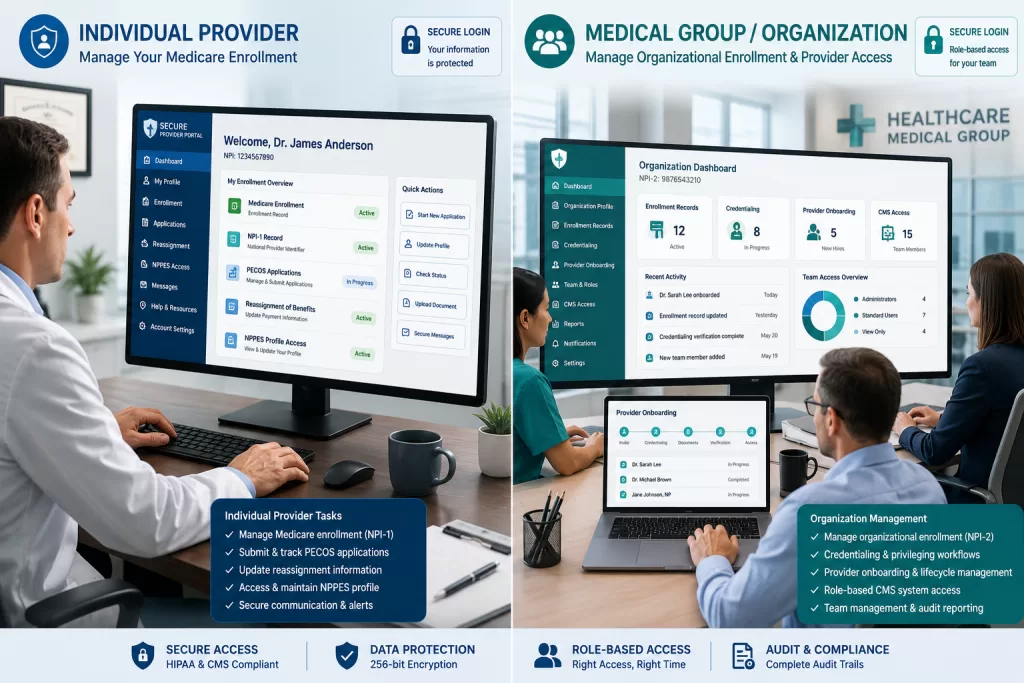
Organizations and medical groups use the CMS I&A system to manage group affiliation and provider enrollment, and to control access tied to organizational enrollment records associated with NPI-2 entities. This includes physician groups, clinics, hospitals, DME suppliers, and other healthcare organizations participating in Medicare programs. Organizational accounts often involve multiple staff members with different access levels. Those permissions may be tied to enrollment management, provider onboarding, and credentialing operations.
Third-party organizations, such as billing companies, credentialing services, and teams managing CAQH ProView credentialing workflows, may also establish CMS I&A relationships through approved surrogacy connections. These arrangements allow authorized third parties to assist with provider enrollment, Medicare applications, credentialing support, and related administrative workflows. They also help maintain CMS security and access controls.
All of these user structures operate within the same CMS Identity and Access Management framework, but each carries different responsibilities, permissions, and operational access requirements.
Understanding CMS I&A User Roles and Permissions
The CMS Identity and Access Management System uses several primary user roles to govern how providers, staff members, organizations, and third-party entities interact with systems such as PECOS and NPPES. Proper role assignment is important because these permissions directly affect provider enrollment workflows, Medicare access management, and organizational security. Incorrect role assignments can quickly create operational problems.
| CMS I&A Role | Primary Responsibility | Typical User |
|---|---|---|
| Authorized Official (AO) | Legal and organizational approval authority | Practice owner or executive leader |
| Access Manager (AM) | Day-to-day user access management | Credentialing manager or practice administrator |
| End User Staff | Administrative workflow support | Billing or enrollment staff |
| Surrogate | Third-party enrollment or credentialing support | Billing company or credentialing vendor |
Authorized Official (AO)
The Authorized Official (AO) is typically the individual legally authorized to act on behalf of the organization in Medicare enrollment matters. This role often belongs to a practice owner, executive leader, or senior administrator with authority to legally bind the organization to CMS agreements and enrollment actions.
CMS Regulatory Requirement: The Authorized Official (AO) must be a high-level representative who has an ownership interest or a direct administrative stake in the organization (such as a CEO, CFO, General Partner, or a 5% or greater direct owner). This is the only user role that can legally sign an initial CMS-855 base application or bind the group to Medicare financial responsibilities.
Authorized Officials maintain high-level responsibility for organizational access, user approvals, enrollment oversight, and compliance with CMS access requirements.
Note on Delegated Officials (DO): While not a distinct operational role inside the I&A user interface, your organization’s CMS-855 framework may utilize a Delegated Official (DO). A DO can manage enrollment changes and sign off on revalidations, but their administrative permissions within the I&A system are typically executed under the Access Manager or End User role parameters.
Access Manager (AM)
The Access Manager (AM) role is responsible for managing day-to-day user access and operational permissions within the CMS I&A system. Access Managers may approve or revoke staff access, manage surrogacy relationships, and oversee operational access across connected systems such as PECOS and NPPES. This role often becomes central to maintaining continuity in the enrollment workflow.
In many healthcare organizations, the Access Manager role is commonly assigned to credentialing managers, practice administrators, enrollment specialists, or operational leadership staff involved in provider enrollment workflows.
End User Staff
End User Staff roles are generally assigned to employees who require system access to support administrative functions such as credentialing, billing, provider enrollment support, or enrollment status monitoring.
These users may have limited operational access depending on organizational permissions, but typically cannot approve major access changes or manage high-level organizational settings.
Surrogate
A Surrogate is an approved third-party individual or organization authorized to perform enrollment or credentialing-related activities on behalf of a provider or healthcare organization within connected CMS systems.
Billing companies, credentialing services, and enrollment consultants commonly operate through surrogate relationships when assisting with Medicare enrollment and provider administration workflows.
Because surrogate permissions can affect access to sensitive enrollment information, healthcare organizations should periodically review active surrogate relationships and remove outdated third-party access when operational relationships change.
Compliance Alert
Third-party access relationships frequently outlive the operational need that created them. Periodic surrogate reviews help reduce unnecessary exposure to sensitive enrollment information.
How CMS I&A Access Works Across PECOS, NPPES, and Other CMS Systems
One of the most common areas of confusion within the CMS Identity and Access Management System is understanding how permissions function across connected CMS platforms.
While users typically maintain a single CMS I&A username and password, access permissions are still managed separately for each connected system. That includes PECOS, NPPES, and other CMS applications.
For example, a user may have Access Manager permissions within PECOS but still require separate approval before accessing NPPES or other CMS-related systems.
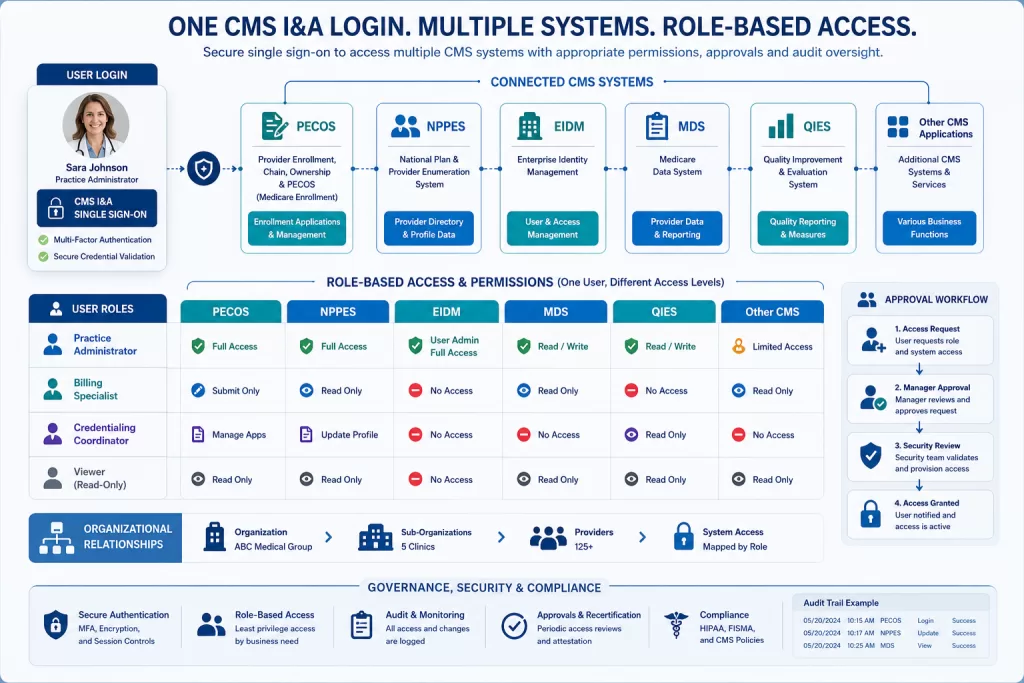
Access rights are tied not only to the user’s account, but also to the specific business functions and organizational relationships approved within the CMS I&A framework. In other words, a single login does not automatically grant full access across all CMS platforms. Separate approvals are still required for many connected systems and functions.
This structure allows CMS to maintain stronger oversight, audit tracking, and role-based security controls across Medicare enrollment and provider management systems.
When users encounter permission-related errors, the issue is often due to incomplete approvals, missing role assignments, or unapproved access to business functions rather than a technical system problem.
Building a CMS I&A Workflow for Credentialing Teams
Healthcare organizations should establish consistent operational processes for monitoring CMS I&A access, reviewing organizational permissions, and maintaining accurate staff relationships across connected CMS systems.
Because provider enrollment activities often involve multiple staff members, departments, and third-party organizations, CMS I&A access management can become difficult to coordinate without clearly defined ownership and review processes.
Organizations should periodically review active staff permissions and remove outdated user access. They should also confirm surrogate relationships remain appropriate and ensure organizational contact information stays current across connected enrollment systems.
Are your CMS I&A permissions putting your Medicare enrollment at risk? In this walkthrough, I break down exactly how to audit your Identity and Access system, identify unauthorized users, and implement a secure governance routine to protect your practice from compliance gaps.
CMS I&A Password Management, Access Issues, and Troubleshooting
Once user roles and organizational permissions are established, the next operational challenge is managing ongoing access, account maintenance, and troubleshooting across connected CMS systems.
Because the CMS Identity and Access Management System controls access to provider enrollment platforms such as PECOS and NPPES, login or permission issues can quickly disrupt credentialing workflows, Medicare credentialing and enrollment activities, and provider onboarding processes.
Understanding how password management, access approvals, connection requests, and troubleshooting workflows function within the CMS I&A system can help healthcare organizations reduce enrollment delays and avoid unnecessary support requests. It also helps organizations maintain more consistent operational access across Medicare-related systems.
CMS I&A Password Recovery and Account Security
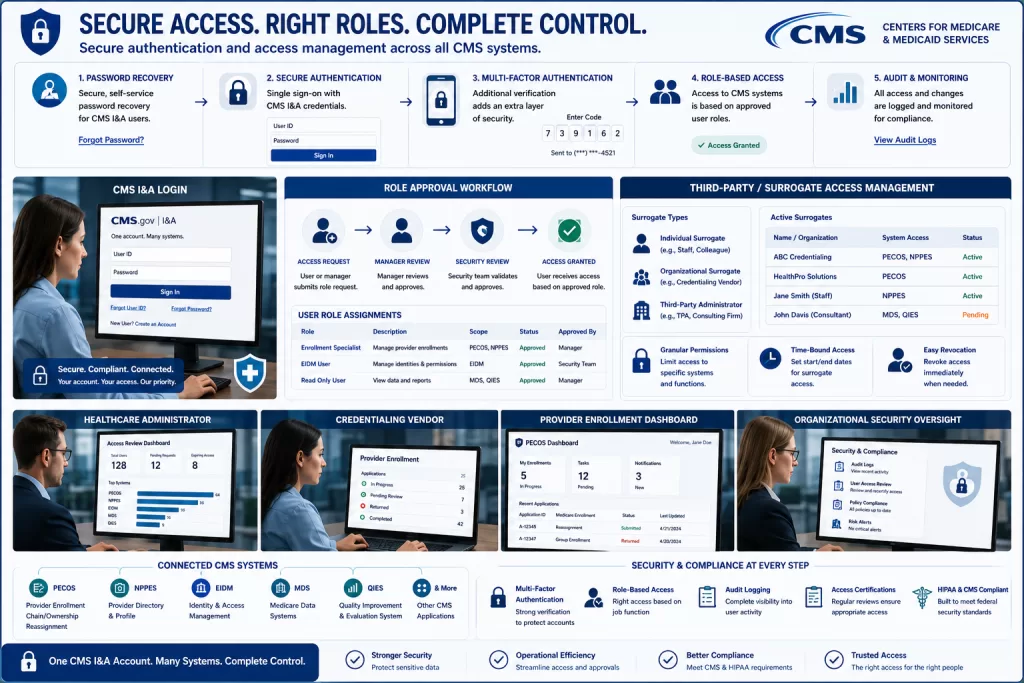
Password recovery and account access management are among the most common operational issues within the CMS Identity and Access Management System. Fortunately, the CMS I&A portal includes built-in account recovery tools that allow users to retrieve usernames, reset passwords, and restore account access through identity verification and security confirmation processes.
Because CMS I&A credentials connect directly to systems like PECOS and NPPES, password management should be treated as part of an organization’s broader provider enrollment and compliance workflow. Expired passwords, outdated recovery information, or inaccessible authentication methods can disrupt provider enrollment and delay credentialing. They can also temporarily restrict access to Medicare-related systems.
Healthcare organizations should encourage staff members to maintain secure password practices, keep authentication methods up to date, and avoid sharing credentials between employees. Individual account accountability helps preserve audit integrity and security oversight. It also improves operational tracking across connected CMS systems.
Managing Connections and Surrogacy Access in CMS I&A
The CMS Identity and Access Management System uses connection and surrogacy relationships to control how providers, organizations, staff members, and third-party entities interact across connected CMS systems.
These relationships are especially important for credentialing companies, billing organizations, enrollment consultants, and healthcare groups managing provider enrollment activities on behalf of multiple providers or organizations.
Within the CMS I&A framework, surrogate relationships allow approved third parties to access systems like PECOS or NPPES on behalf of authorized providers or organizations.
In most cases, the workflow follows several operational steps:
- Establish the Core Profile: The individual provider or medical group registration must be completed first to generate an active NPI-1 or NPI-2 reference entity.
- Initiate the Request: The third-party vendor (such as an external billing company or independent credentialing consultant) logs into their own I&A account and submits a formal Surrogacy Connection Request using the target provider’s or group’s legal identifiers.
- Execute the Internal Approval: The organization’s designated Authorized Official (AO) or Access Manager (AM) must log in and review the pending connection request profile under their dashboard alerts. They must then explicitly grant the security relationship.
- Define Scope Restrictions: The admin team maps out specific access boundaries. This may include limiting the third party to defined business functions, such as modifying PECOS applications, without granting full global account control.
One common operational issue occurs when organizations approve surrogate relationships broadly during onboarding but fail to review them later during staffing or vendor changes.
In some cases, former billing vendors or credentialing organizations may retain unnecessary access to provider enrollment systems long after operational relationships have ended. Periodic review of active surrogate connections helps reduce unnecessary security exposure. It also helps maintain cleaner oversight of enrollment.
Surrogate relationships are often approved quickly during onboarding but forgotten once operations normalize. Over time, organizations can accumulate outdated third-party access relationships that no longer reflect current operational responsibilities or vendor relationships.
Common CMS I&A Access Problems and Support Resources
Healthcare organizations and provider enrollment teams commonly encounter operational issues related to account access, password recovery, role approvals, and connection management within the CMS Identity and Access Management System.
Many of these problems can disrupt provider enrollment workflows, delay Medicare application processing, or temporarily restrict access to systems such as PECOS and NPPES.
Some of the most common CMS I&A issues include:
| Common CMS I&A Issue | Typical Cause | Operational Impact |
|---|---|---|
| Expired passwords or MFA failures | Outdated authentication methods or inactive devices | Temporary loss of access to PECOS or NPPES |
| Incomplete role approvals | Missing AO or Access Manager approval | Delays in provider enrollment activities |
| Incorrect recovery information | Old email addresses or phone numbers | Account recovery complications during urgent enrollment updates |
| Disabled surrogate relationships | Vendor or organizational access changes | Third-party enrollment workflows interrupted |
| Permission mismatches | Incorrect business function approvals | Users unable to access specific CMS systems |
| Duplicate account issues | Multiple user profiles tied to one individual | Identity verification and login complications |
Before escalating issues to support, healthcare organizations should first verify that account information, user permissions, and business function approvals are accurate and up to date in the CMS I&A system. Many access-related problems stem from administrative configuration errors rather than technical system failures.
For unresolved issues, the External User Services (EUS) Help Desk serves as the primary CMS support resource for I&A, PECOS, NPPES, and connected enrollment systems. The EUS team can assist with account recovery, role troubleshooting, access management issues, and organizational connection problems. These issues are often tied to Medicare enrollment workflows.
Maintaining CMS I&A Security, Compliance, and Enrollment Access
Once a healthcare organization establishes operational access within the CMS Identity and Access Management System, ongoing account maintenance is essential for maintaining credentialing status, provider enrollment management, credentialing oversight, and organizational compliance.
Because CMS I&A accounts connect directly to Medicare enrollment systems and sensitive provider information, many CMS I&A problems emerge months or years after the initial account setup. This is especially common when organizations grow, staffing changes occur, or enrollment responsibilities shift between departments or vendors.
Regular account reviews, permission audits, staff access updates, and security monitoring can help healthcare organizations reduce enrollment disruptions, strengthen compliance oversight, and prevent avoidable access management issues tied to Medicare-related workflows.
Performing Regular CMS I&A Access Reviews
One of the most important but frequently overlooked operational responsibilities within the CMS Identity and Access Management System is maintaining accurate user access and organizational permissions over time.
As healthcare organizations experience staffing changes, provider onboarding, vendor transitions, and operational restructuring, CMS I&A access relationships can quickly become outdated if they are not reviewed regularly.
Healthcare organizations should periodically review:
- Active staff user access and permissions
- Authorized Official and Access Manager assignments
- Surrogate and third-party organizational relationships
- Pending connection or role approval requests
- Access rights tied to PECOS, NPPES, and related CMS systems
Small access problems often stay hidden until an urgent enrollment update or reassignment request exposes them.
Compliance Alert
Employee departures frequently create CMS access vulnerabilities. Organizations that fail to update permissions promptly may face both security concerns and enrollment workflow disruptions.
Healthcare organizations commonly encounter access management problems after employee turnover or role restructuring occurs without corresponding CMS I&A updates. A departing office manager, credentialing specialist, or Access Manager may still retain active permissions inside PECOS or related CMS systems months after leaving the organization.
In other situations, new operational staff inherit enrollment responsibilities without the required CMS approvals, causing delays in Medicare enrollment updates or reassignment activities.
Building a CMS I&A Security and Access Management Routine
Because the CMS Identity and Access Management System controls access to sensitive provider enrollment and Medicare-related systems, healthcare organizations should establish consistent internal security and access management routines tied to credentialing and operational workflows.
Organizations should maintain strong password management practices, require individual staff access accounts, and regularly verify that authentication methods and recovery information remain current. Multi-factor authentication should remain enabled for all users accessing CMS-connected systems. This is particularly important for staff members managing provider enrollment, credentialing, reassignment, or Medicare application workflows.
Healthcare organizations should also integrate CMS I&A oversight into broader onboarding, offboarding, compliance, and operational review processes. Establishing standardized access management procedures can help reduce operational disruptions and strengthen audit readiness. It can also improve organizational oversight across connected CMS enrollment systems.
Performing Organizational CMS I&A Access Audits
Healthcare organizations should periodically perform internal CMS I&A access audits as part of broader compliance, credentialing, and operational review processes. Regular access reviews help ensure user permissions remain aligned with current staff responsibilities, provider enrollment workflows, and organizational security requirements.
During these reviews, organizations should verify:
| Review Area | What Organizations Should Verify |
|---|---|
| Authorized Official assignments | Correct leadership and approval ownership |
| Access Manager permissions | Current operational staff maintain proper access |
| Staff user accounts | Former employees no longer retain access |
| Surrogate relationships | Third-party vendors still require active permissions |
| PECOS and NPPES access | Business function permissions remain accurate |
| Pending approval requests | Incomplete access requests are resolved promptly |
Organizations should also evaluate whether staff members maintain only the level of access necessary for their operational responsibilities. Excessive permissions, outdated organizational relationships, or inactive user accounts can increase compliance exposure. They can also create unnecessary risks in enrollment management.
Regular access reviews help organizations catch permission issues before they interrupt provider enrollment activities or create avoidable processing delays during personnel or vendor changes.
How CMS I&A Supports Credentialing and Provider Enrollment Workflows
The CMS Identity and Access Management System plays an important operational role within provider credentialing, Medicare enrollment, reassignment management, and organizational access workflows. Because CMS I&A serves as the authentication and access management layer for systems like PECOS and NPPES, many provider enrollment activities depend directly on accurate account configuration and role management. Access problems in CMS I&A can quickly affect connected enrollment workflows.
When providers, medical practices, credentialing teams, and third-party organizations maintain properly configured CMS I&A relationships, enrollment workflows generally become easier to manage and less vulnerable to avoidable access delays. Accurate role approvals and organizational permissions often help Medicare enrollment updates and reassignment activities move more efficiently through PECOS and related CMS systems. Clear access management also reduces operational confusion during staffing changes and onboarding events.
For credentialing companies and enrollment specialists managing multiple provider relationships, surrogate access structures within the CMS I&A framework also help centralize operational access while maintaining CMS security and compliance controls across multiple healthcare organizations.
Integrating CMS I&A Oversight Into Daily Operations
Healthcare organizations should establish standardized internal procedures for managing CMS I&A permissions, role approvals, onboarding access, surrogate relationships, and provider enrollment responsibilities. Clear ownership of CMS access oversight helps reduce confusion during staffing transitions, provider onboarding, vendor changes, and Medicare enrollment updates. It also improves accountability for enrollment-related access management.
Organizations should also maintain internal documentation related to Authorized Official assignments, Access Manager responsibilities, access review schedules, authentication procedures, and third-party access approvals. This documentation supports operational consistency and compliance oversight.
CMS I&A oversight should be integrated into organizational onboarding and offboarding procedures. So new staff members receive appropriate role-based access, while departing employees have organizational permissions removed promptly.
Staying Current with CMS I&A and Medicare Enrollment Changes
The CMS Identity and Access Management System continues to evolve as CMS updates enrollment processes, security requirements, authentication standards, and operational access policies across connected systems. Healthcare organizations involved in provider enrollment and credentialing workflows should regularly monitor CMS communications. This helps organizations remain aware of policy changes, MFA updates, access management requirements, and enrollment-related system changes.
Organizations may benefit from periodically reviewing CMS enrollment guidance, Medicare Learning Network (MLN) updates, and CMS operational resources related to provider enrollment and access management. Staying informed can help reduce workflow disruptions. It can also improve organizational readiness when CMS implements system or policy updates affecting connected enrollment platforms.
For unresolved technical or operational access issues, the External User Services (EUS) Help Desk remains the primary CMS support resource for CMS I&A, PECOS, NPPES, and related Medicare enrollment systems.
CMS I&A Workflow Considerations for Healthcare Organizations
For many healthcare organizations, CMS I&A issues only receive attention after access problems interrupt an active enrollment or reassignment request. Establishing clear ownership of CMS access management before those problems occur is often what separates organized enrollment operations from reactive administrative cleanup.
Final Thoughts: Managing CMS I&A Within Provider Enrollment Workflows
The CMS Identity and Access Management System plays a central role in Medicare enrollment, provider credentialing, organizational access management, and healthcare administrative operations. Because systems like PECOS and NPPES rely directly on CMS I&A authentication and role management, maintaining accurate access relationships is an important part of keeping provider enrollment workflows stable, secure, and operationally efficient. Even small access problems can create larger operational disruptions later.
Operational Snapshot
Successful CMS I&A management depends on clear ownership, routine access reviews, and disciplined permission oversight. Organizations that proactively manage access relationships experience fewer enrollment delays and stronger operational continuity.
For healthcare organizations, provider groups, credentialing specialists, billing companies, and enrollment teams, the CMS I&A system offers far more than basic account access. User permissions, surrogate relationships, role approvals, and organizational access controls all influence how efficiently providers can manage Medicare enrollment activities and reassignment workflows. They also affect NPI management and connected CMS operational processes.
Organizations that fail to actively manage CMS I&A permissions often discover access problems at the worst possible time — during active Medicare enrollments, provider onboarding, reassignment processing, or staffing transitions.
In many cases, the actual enrollment issue is not PECOS itself but outdated organizational access relationships that were never properly reviewed or updated. Most enrollment access problems are discovered reactively rather than proactively.
Frequently Asked Questions About the CMS Identity and Access Management System
What happens if an Access Manager leaves the organization?
If an Access Manager leaves the organization without properly transferring permissions or updating organizational access relationships, healthcare Organizations may temporarily lose access to systems like PECOS or NPPES.
This can delay Medicare enrollment updates, provider onboarding, reassignment requests, and credentialing workflows until access permissions are restored via the CMS I&A system.
Organizations should periodically review Authorized Official and Access Manager assignments to reduce operational disruptions during staffing transitions.
Why do healthcare organizations lose CMS I&A access after staffing changes?
Many CMS I&A access problems occur during staffing transitions when authentication methods, organizational permissions, or surrogate relationships remain tied to former employees or outdated contact information.
Common issues include MFA connected to inactive phone numbers, unresolved Access Manager changes, outdated recovery email addresses, or credentialing responsibilities transferred without corresponding CMS role approvals.
Maintaining up-to-date organizational access records and regularly reviewing user permissions can help reduce these operational issues.
Can a credentialing company or billing company access PECOS through CMS I&A?
Yes. Third-party enrollment organizations commonly access PECOS and related CMS systems through approved surrogate relationships established within the CMS I&A framework.
These surrogate relationships allow authorized third parties to assist with provider enrollment, reassignment updates, credentialing support, and operational enrollment workflows on behalf of healthcare organizations and providers.
Access permissions are controlled by the Authorized Official or Access Manager associated with the organization.
Can the same CMS I&A login be used for PECOS and NPPES?
Yes. Users typically maintain a single CMS I&A username and password across connected CMS systems, such as PECOS and NPPES. However, access permissions are still approved separately by the system and business function.
A user may have access to PECOS but still require additional approval before accessing NPPES or other CMS-related platforms.
Where can healthcare organizations get help with CMS I&A issues?
The External User Services (EUS) Help Desk serves as the primary CMS support resource for issues related to CMS I&A, PECOS, NPPES, and connected Medicare enrollment systems.
The EUS team can assist with account recovery, role troubleshooting, access management issues, organizational relationship problems, and operational access disruptions affecting provider enrollment workflows.
Before contacting support, organizations should first verify that account information, role assignments, authentication methods, and business function permissions are up to date and correctly configured within the CMS I&A system.
About the Author
Jennifer Blevens-Smith is the founder and sole consultant driving Integral Clinic Solutions. Armed with deep domain expertise and a commitment to protecting independent medicine, she delivers the personalized, executive-level guidance that healthcare leaders need to build sustainable, high-performing organizations.
Need Help Strengthening Your Medical Practice Operations?
Integral Clinic Solutions provides practical support for medical practices navigating credentialing, contracting, revenue cycle operations, compliance workflows, front-office systems, and practice management challenges.
Explore more operational guidance, compliance insights, and healthcare business resources on the Integral Clinic Solutions blog. New articles and updates are added regularly for practice owners, administrators, and healthcare teams.
Disclaimer: This content is for informational and educational purposes only and does not constitute legal, coding, billing, compliance, financial, or medical advice. Healthcare practices must verify all operational requirements with applicable payers, regulators, and qualified professionals. Read our full Legal & Compliance Disclaimer.